This page is still in its early stages. I will keep adding to it regularly. If you are looking for a formula, send me a message. Likewise, if you have original formulas, please let me know. They may be useful to others.
- ENT(x): integer part of x. e.g.
ENT(12,4)=12 - x MOD y: remainder of x divided by y. e.g.
17 MOD 3 = 2
| Index | Formula |
|---|---|
| CG_JJ | Conversion of a Gregorian calendar date into a Julian day J = day M = month A = year JJ = 367 * A - ENT(1,75 * (ENT((M + 9) / 12) + A )) + ENT(275 * M / 9) - ENT(0,75 * (1 + ENT(0,01 * (ENT((M - 9) / 7) + A)))) + J + 1721028,5 |
| CG_NBJ | Number of days between two Gregorian calendar dates For each of the two dates, compute the Result value and subtract one from the other. J = day M = month A = year b = 365 * A c = 31 * (M - 1) if M = 1 or M = 2 then d = 0 e = ENT ((A - 1)/4) h = ENT (0,75 * (ENT ((A - 1) / 100) + 1 )) if M is neither 1 nor 2 then d = ENT(0,4 * M + 2,3) e= ENT (A/4) h = ENT (0,75 * (ENT (A/100) + 1 )) Result = J + b + c - d + e - h |
| CJ_JJ | Conversion of a Julian calendar date into a Julian day J = day M = month A = year if month if A then JJ = ENT(365,25 * A - 0,75) + ENT(30,6001 * (M + 1)) + J + 1720994,5 if A>= 0 => JJ = ENT(365,25 * A) + ENT(30,6001 * (M + 1)) + J + 1720994,5 |
| CR | Rules for building Roman numerals. The letters used to build Roman numerals (and dates) are (always uppercase): I = 1; V = 5; X = 10; L = 50; C = 100; M = 1 000. A letter with a bar above it has its value multiplied by 1,000. Thus <img src="/m/calendar-saga/thematic-studies/calculation-formulas/vii_729_1.png“srcset=”/m/calendar-saga/thematic-studies/calculation-formulas/vii_729_1.png 1x, /m/calendar-saga/thematic-studies/calculation-formulas/vii_729_3.png 1x“alt=”“class=”o-pic__img o-pic__img--ld o-pic__img--natural o-pic__img--inline"/> has the value 7,000 Numerals are read from left to right, in descending values: MCLII = 1000 + 100 + 50 + 2 Letters may be repeated except V, L and D If one letter would need to be repeated more than four times, that letter should be followed by the next “higher” letter: e.g. IV (one subtracted from 5) rather than IIII (although IIII can be found in ancient Roman notation) For thousands, the letter M is repeated as many times as necessary. Example: MMMMM = 5000. Only multiples and submultiples of ten can serve as “subtractors”: I, X, C, etc. VL for 45 is incorrect. IX for 9 is correct. The “subtractor” cannot be doubled. VIII for 8 is correct; IIX for 8 is incorrect because I is doubled. One letter cannot be subtracted from another letter whose value is more than ten times larger. In other words, a letter can only be subtracted from the next one in sequence: I from V, V from X, X from L... MIM for 1999 is therefore incorrect |
| CS | Solar cycle. Also shown in the postal calendar A = year S = ((A + 8) MOD 28) + 1 |
| EG | Gregorian epact. Also shown in the postal calendar A = year C = first two digits of the year Eg = (11 * (A mod 19) + 8 - C + ENT(C / 4) + ENT((8 * C + 13) / 25)) MOD 30 If Eg = 25 and N>11, Eg = 25 (in bold) |
| EJ | Julian epact Ej = (N + 10(N-1)) MOD 30 ; N = golden number (see NO) |
| FETES | P = EASTER date ASCENSION = P + 39 days PENTECOST = P + 49 days |
| JJ_CG | Conversion of a Julian day into a Gregorian calendar date JJ = integer part of the Julian day a = JJ + 32045 b= ENT(4 * (a + 36524) / 146097) - 1 c = a - ENT(146097 * b / 4) d = ENT(4 * (c + 365) / 1461) - 1 e = c - ENT(1461 * d / 4) m = ENT((5 * (e - 1) + 2) / 153) Results: day = e - ENT(((153 * m) + 2) / 5) month = m + 3 - 12 * ENT(m / 10) year = (100 * b) - 4800 + ENT(m / 10) + d |
| JJ_CJ | Conversion of a Julian day into a Julian calendar date JJ = integer part of the Julian day b = 0 c = JJ + 32083 d = ENT(4 * (c + 365) / 1461) - 1 e = c - ENT(1461 * d / 4) m = ENT((5 * (e - 1) + 2) / 153) Results: day = e - ENT((153 * m) + 2 / 5) month = m + 3 - 12 * ENT(m / 10) year = 100 * b - 4800 + ENT(m / 10) + d |
| LDG | Dominical letter in the Gregorian calendar. Also shown in the postal calendar C = first two digits of the year U = last two digits of the year Lg = ((2C - U - ENT(U /4) - ENT(C/4)) MOD 7) + 1 result: 1=A ; 2=B... |
| LDJ | Dominical letter in the Julian calendar. S = solar cycle of the year (see CS) Lj = ((6 - S - (ENT(S - 1) / 4)) MOD 7) + 1 result: 1=A ; 2=B.... |
| NO | Golden number. Also shown in the postal calendar A = year N= (A MOD 19) + 1 |
| PQ1 | Easter date from the Gregorian epact and Gregorian dominical letter E = epact (see EG) L = dominical letter (see EG) if E = 24 and L = 4 => E = -5 if E = 25 and L = 3 => E = -4 if E > 23 => E = E - 30 P = 45 - E + ((E + L + 1) MOD 7) |
| PQ2 | Easter date in the Julian calendar. Proceed with successive divisions, keeping the remainder and, where relevant, the quotient. A = year 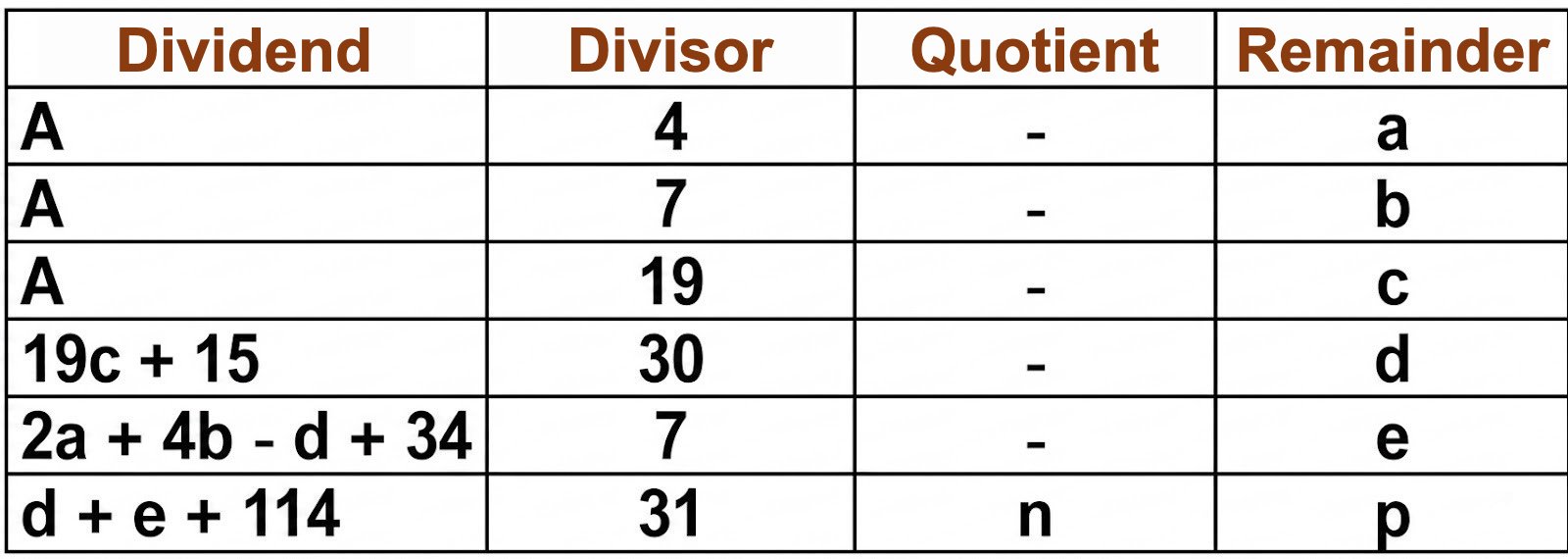 Results: n = month (3 = March; 4 = April) Day number in month for Easter date = p + 1 |
| PQ3 | Easter date in the Gregorian calendar (from 1583). Proceed with successive divisions, keeping the remainder and, where relevant, the quotient. A = year 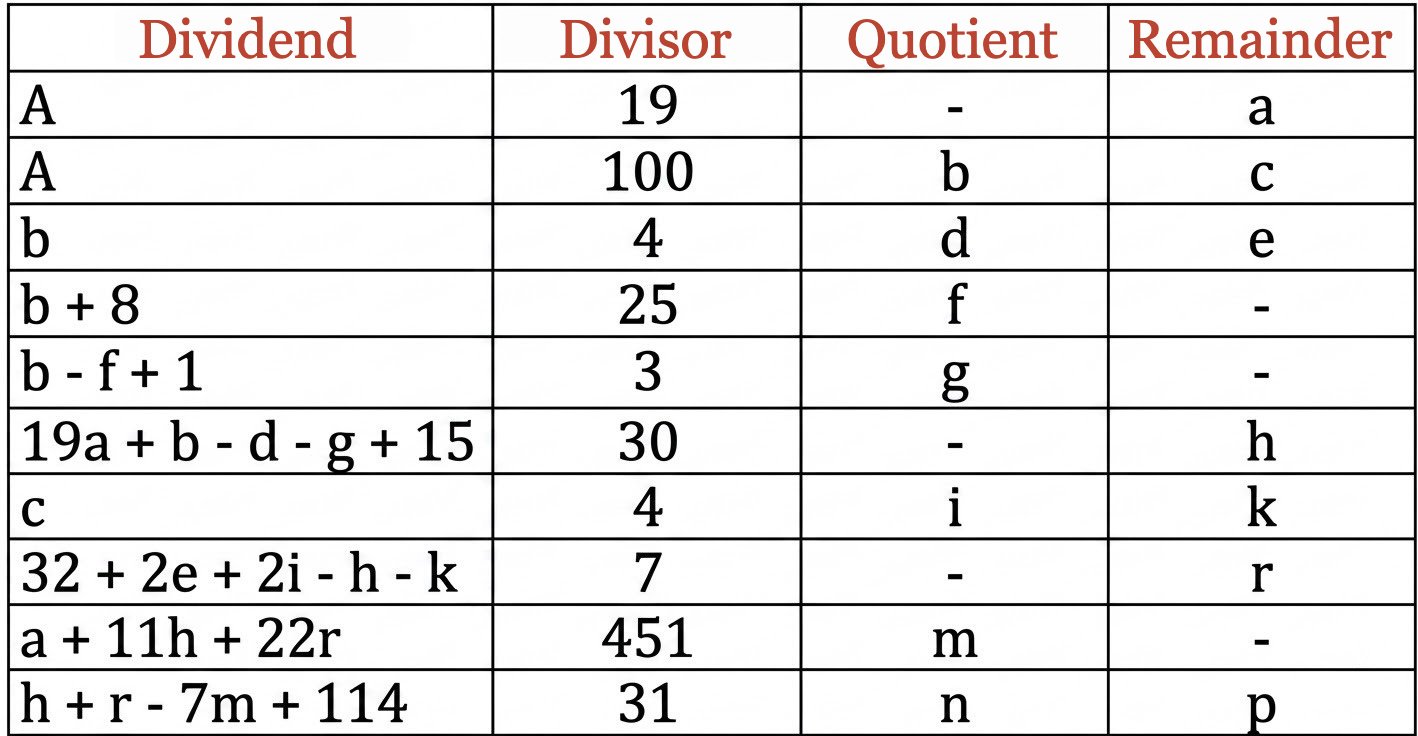 Results: n = month (3 = March; 4 = April) Day number in month for Easter date = p + 1 |
| HMS1 | Conversion of hours, minutes, seconds into decimal hours H = hours M = minutes S = seconds a = S / 60 b = (M + a) / 60 HD = H + b |
| HMS2 | Conversion of decimal hours into hours, minutes, seconds HD = decimal hour a = (decimal part of HD * 60) minutes = integer part of a b = (decimal part of a * 60) seconds = integer part of b hours = integer part of HD |
| JSEM1 | Find day of week from a date Let the date be J/M/SD (S = first two digits of the year, D = last two digits) The day-of-week value JSEM is = J + 3M - ENT(3M/10) + 5S + ENT(S/4) + D + ENT(D/4) + C C=3 for January and February if the year is leap C=4 for January and February if the year is not leap C=2 for April C=0 for December C=1 in all other cases Take the remainder of JSEM/7 Result: Saturday = 0 ; Sunday = 1 ; Monday = 2... Source: dictionary of recreational mathematics |
| JSEM2 | Find day of week from a Julian Day (at 00:00 UT) Add 1.5 to JJ Divide by 7 Result: Saturday = 0 ; Sunday = 1 ; Monday = 2... |
| OL_J | Find the Julian year from the Olympiad Let n be the Olympiad number, p the additional index (1st, 2nd, 3rd, 4th year of the nth Olympiad) BC period: Julian year = 776 - ((n - 1) X 4 + (p - 1)) AD period: Julian year = (n - 1) X 4 + p - 776 |
| J_OL | Find the Olympiad and additional index from the Julian year Let n be the number of Olympiads, p the additional index (1st, 2nd, 3rd, 4th year of the nth Olympiad) A = Julian year BC period: If the decimal part of (776-A)/4 = 0, p=1, n=(ENT(776 - A)/4)) +1 If the decimal part of (776-A)/4 = 25, p=2, n=(ENT(776 - A)/4)) +1 If the decimal part of (776-A)/4 = 50, p=3, n=(ENT(776 - A)/4)) +1 If the decimal part of (776-A)/4 = 75, p=4, n=(ENT(776 - A)/4)) +1 AD period: If the decimal part of (776+A)/4 = 25, p=1, n=(ENT(776 +A)/4)) +1 If the decimal part of (776+A)/4 = 50, p=2, n=(ENT(776 +A)/4)) +1 If the decimal part of (776+A)/4 = 75, p=3, n=(ENT(776 +A)/4)) +1 If the decimal part of (776+A)/4 = 00, p=4, n=(ENT(776 +A)/4) ) |
| EXCEL FORMULAS | |
| EXC_AT | Length of the tropical year for a given Julian day. Julian day in B1 IN B4: =(B1-2451545)/365250 IN B3: =365,2421905166-61,5607*(10^-6)*B4-68,4*(10^-9)*(B4^2)+263*(10^-9)*(B4^3)+3,2*(10^-9)*(B4^4) = tropical year length. |
| EXC_CS | Solar cycle in the Julian and Gregorian calendars. Thanks to Daniel LACROZE-MARTY Name the cell containing the year as YEAR =MOD(ANNEE+8;28)+1 |
| EXC_EG | Epact in the Gregorian calendar. Thanks to Daniel LACROZE-MARTY Name the cell containing the year as YEAR =SI(ET(MOD(11*MOD(ANNEE;19)+ 8-ENT(ANNEE/100)+ENT(ENT(ANNEE/100)/4)+ENT((8*ENT(ANNEE/100)+13)/25);30)=25;MOD(ANNEE;19)+1>11);"XXV"; MOD(11*MOD(ANNEE;19)+ 8-ENT(ANNEE/100)+ENT(ENT(ANNEE/100)/4)+ENT((8*ENT(ANNEE/100)+13)/25);30)) |
| EXC_EJ | Epact in the Julian calendar. Thanks to Daniel LACROZE-MARTY Name the cell containing the year as YEAR =MOD(11*MOD(ANNEE;19)+8;30) |
| EXC_IR | Roman indiction in the Julian and Gregorian calendars. Thanks to Daniel LACROZE-MARTY Name the cell containing the year as YEAR =MOD(ANNEE+2;15)+1 |
| EXC_LDG | Dominical letter in the Gregorian calendar. Thanks to Daniel LACROZE-MARTY Name the cell containing the year as YEAR =SI(ENT(365,25*(ANNEE))+SI((ANNEE+1) |
| EXC_LDJ | Dominical letter in the Julian calendar. Thanks to Daniel LACROZE-MARTY Name the cell containing the year as YEAR =SI(MOD(ANNEE;4)=0;CHOISIR(MOD(ENT(ANNEE/100)+2-(ANNEE-ENT(ANNEE/100)*100)-ENT((ANNEE -ENT(ANNEE/100)*100)/4);7)+1;"B";"C";"D";"E";"F";"G";"A");"")&CHOISIR(MOD(ENT(ANNEE/100)+2-(ANNEE -ENT(ANNEE/100)*100)-ENT((ANNEE-ENT(ANNEE/100)*100)/4);7)+1;"A";"B";"C";"D";"E";"F";"G") |
| EXC_NO | Golden number in the Julian and Gregorian calendars. Thanks to Daniel LACROZE-MARTY Name the cell containing the year as YEAR =MOD(ANNEE;19)+1 |
| EXC_PQ1CTRLG | Year check for the Easter date in the Gregorian calendar. Thanks to Daniel LACROZE-MARTY Name the cell containing the year as YEAR =SI(ANNÉE |
| EXC_PQ1JG | Day of the Easter date in the Gregorian calendar. Thanks to Daniel LACROZE-MARTY Name the cell containing the year as YEAR =MOD(MOD(19*MOD(ANNÉE;19)+ENT(ANNÉE/100)-ENT(ENT(ANNÉE/100)/4)-ENT((ENT(ANNÉE/100) -ENT((ENT(ANNÉE/100)+8)/25)+1)/3)+15;30)+ MOD(32+2*MOD(ENT(ANNÉE/100);4)+2*ENT(MOD(ANNÉE;100)/4) -MOD(19*MOD(ANNÉE;19)+ENT(ANNÉE/100)-ENT(ENT(ANNÉE/100)/4)-ENT((ENT(ANNÉE/100) -ENT((ENT(ANNÉE/100)+8)/25)+1)/3)+15;30)-MOD(MOD(ANNÉE;100);4);7)-7 * ENT((MOD(ANNÉE;19)+11*MOD(19*MOD(ANNÉE;19)+ENT(ANNÉE/100)-ENT(ENT(ANNÉE/100)/4)-ENT((ENT(ANNÉE/100) -ENT((ENT(ANNÉE/100)+8)/25)+1)/3)+15;30)+22* MOD(32+2*MOD(ENT(ANNÉE/100);4)+2*ENT(MOD(ANNÉE;100)/4) -MOD(19*MOD(ANNÉE;19)+ENT(ANNÉE/100)-ENT(ENT(ANNÉE/100)/4)-ENT((ENT(ANNÉE/100) -ENT((ENT(ANNÉE/100)+8)/25)+1)/3)+15;30)-MOD(MOD(ANNÉE;100);4);7))/451)+114;31)+1 |
| EXC_PQ1JJ | Day of the solar Easter date in the Julian calendar. Thanks to Daniel LACROZE-MARTY Name the cell containing the year as YEAR =MOD(MOD(19*MOD(ANNEE;19)+15;30)+MOD(2*MOD(ANNEE;4)+4*MOD(ANNEE;7) -MOD(19*MOD(ANNEE;19)+15;30)+34;7)+114;31)+1 |
| EXC_PQ1MG | Month of the Easter date in the Gregorian calendar. Thanks to Daniel LACROZE-MARTY Name the cell containing the year as YEAR =ENT((MOD(19*MOD(ANNÉE;19)+ENT(ANNÉE/100)-ENT(ENT(ANNÉE/100)/4)-ENT((ENT(ANNÉE/100) -ENT((ENT(ANNÉE/100)+8)/25)+1)/3)+15;30)+ MOD(32+2*MOD(ENT(ANNÉE/100);4)+2*ENT(MOD(ANNÉE;100)/4) -MOD(19*MOD(ANNÉE;19)+ENT(ANNÉE/100)-ENT(ENT(ANNÉE/100)/4)-ENT((ENT(ANNÉE/100) -ENT((ENT(ANNÉE/100)+8)/25)+1)/3)+15;30)-MOD(MOD(ANNÉE;100);4);7)-7 * ENT((MOD(ANNÉE;19)+11*MOD(19*MOD(ANNÉE;19)+ENT(ANNÉE/100)-ENT(ENT(ANNÉE/100)/4)-ENT((ENT(ANNÉE/100) -ENT((ENT(ANNÉE/100)+8)/25)+1)/3)+15;30)+22* MOD(32+2*MOD(ENT(ANNÉE/100);4)+2*ENT(MOD(ANNÉE;100)/4) -MOD(19*MOD(ANNÉE;19)+ENT(ANNÉE/100)-ENT(ENT(ANNÉE/100)/4)-ENT((ENT(ANNÉE/100) -ENT((ENT(ANNÉE/100)+8)/25)+1)/3)+15;30)-MOD(MOD(ANNÉE;100);4);7))/451)+114)/31) |
| EXC_PQ1MJ | Month of the Easter date in the Julian calendar. Thanks to Daniel LACROZE-MARTY Name the cell containing the year as YEAR =ENT((MOD(19*MOD(ANNEE;19)+15;30)+MOD(2*MOD(ANNEE;4)+4*MOD(ANNEE;7) -MOD(19*MOD(ANNEE;19)+15;30)+34;7)+114)/31) |
| EXC_PQ2 | Easter date Year in A1 In another cell (date format) : =ARRONDI(DATE(A1;4;MOD(234-11*MOD(A1;19);30))/7;)*7-6 |
| EXC_SJJ | Day of week from a Julian day. Thanks to Daniel LACROZE-MARTY Name the cell containing the Julian day as JJ =CHOISIR(MOD(JJ+1,5;7)+1;"Sunday";"Monday";"Tuesday";"Wednesday";"Thursday";"Friday";"Saturday") |
| EXC_NBJJ | Number of days in the year for the Julian calendar. Thanks to Daniel LACROZE-MARTY Name the cell containing the year as YEAR =SI(MOD(ANNEE ;4)=0 ;366 ;365) |
| EXC_NBJG | Number of days in the year for the Gregorian calendar. Thanks to Daniel LACROZE-MARTY Name the cell containing the year as YEAR =SI(MOD(ANNEE ;400)=0 ;366 ;SI(MOD(ANNEE ;100)=0 ;365 ;SI(MOD(ANNEE ;4)=0 ;366 ;365))) |
| EXC_DTJJ | Get the date from a Julian day. Thanks to Daniel LACROZE-MARTY Name the cell containing the Julian day as JJ. Name other cells DAY, MONTH, YEAR, HOURS, MINUTES, SECONDS. In the DAY cell: =SI(ENT(JJ+0,5) ENT(JJ+0,5)+1+ENT((ENT(JJ+0,5)-1867216,25)/36524,25)-ENT(ENT((ENT(JJ+0,5)-1867216,25)/36524,25)/4))+1524 -ENT(365,25*ENT((SI(ENT(JJ+0,5) ENT(JJ+0,5);ENT(JJ+0,5)+1+ENT((ENT(JJ+0,5)-1867216,25)/36524,25)-ENT(ENT((ENT(JJ+0,5) -1867216,25)/36524,25)/4))+1524-122,1)/365,25)))/30,6001)) In the MONTH cell: =SI(ENT((SI(ENT(JJ+0,5) In the YEAR cell: =SI(MOIS>2,5;ENT((SI(ENT(JJ+0,5) +ENT((ENT(JJ+0,5)-1867216,25)/36524,25)-ENT(ENT((ENT(JJ+0,5)-1867216,25)/36524,25)/4))+1524-122,1) /365,25)-4715) In the HOURS cell: =ENT((JJ+0,5-ENT(JJ+0,5))*24) In the MINUTES cell: =ENT((JJ+0,5-ENT(JJ+0,5))*1440-ENT(HEURES*60)) In the SECONDS cell: =(JJ+0,5-ENT(JJ+0,5))*86400-HEURES*3600-MINUTES*60 |
| EXC_SUNJJ | Get a Julian day from a solar position. Thanks to Daniel LACROZE-MARTY Name the cell containing the year as YEAR and the one containing the sun position as POSITION (in decimal degrees from 0 to 360). Name other cells JJ1, T1, M1, JJ2, T2, M2, JJ3, T3, M3, JJ4, T4, M4, JJ5, T5, M5, JJ. To obtain solstices and equinoxes, set POSITION to 0, 90, 180 or 270 In cell JJ1: =(ANNEE+POSITION/360)*365,2422+1721141,3 In cell T1: =(JJ1-2415020)/36525 In cell M1: =6,256583522+628,301945727*T1-0,000002618*T1*T1-0,000000058*T1*T1*T1 In cell JJ2: =JJ1+58*SIN(POSITION/180*PI()-(4,88162797+628,331950904 *T1 +0,00000528*T1*T1+(0,033500897-0,000083584*T1-0,000000244*T1*T1) *SIN(M1) +(0,000350706-0,000001745*T1)*SIN(2*M1)+0,000005114*SIN(3*M1)-0,0000993092-0,000083601*SIN(4,523544355 -33,7571461*T1))) In cell T2: =(JJ2-2415020)/36525 In cell M2: =6,256583522+628,301945727*T2-0,000002618*T2*T2-0,000000058*T2*T2*T2 In cell JJ3: =JJ2+58*SIN(POSITION/180*PI()-(4,88162797+628,331950904 *T2 +0,00000528*T2*T2+(0,033500897-0,000083584*T2-0,000000244*T2*T2) *SIN(M2) +(0,000350706-0,000001745*T2)*SIN(2*M2)+0,000005114*SIN(3*M2)-0,0000993092-0,000083601 *SIN(4,523544355-33,7571461*T2))) In cell T3: =(JJ3-2415020)/36525 In cell M3: =6,256583522+628,301945727*T3-0,000002618*T3*T3-0,000000058*T3*T3*T3 In cell JJ4: =JJ3+58*SIN(POSITION/180*PI()-(4,88162797+628,331950904 *T3 +0,00000528*T3*T3+(0,033500897-0,000083584*T3-0,000000244*T3*T3 )*SIN(M3) +(0,000350706-0,000001745*T3)*SIN(2*M3)+0,000005114*SIN(3*M3)-0,0000993092-0,000083601 *SIN(4,523544355-33,7571461*T3))) In cell T4: =(JJ4-2415020)/36525 In cell M4: =6,256583522+628,301945727*T4-0,000002618*T4*T4-0,000000058*T4*T4*T4 In cell JJ5: =JJ4+58*SIN(POSITION/180*PI()-(4,88162797+628,331950904 *T4 +0,00000528*T4*T4+(0,033500897-0,000083584*T4-0,000000244*T4*T4) *SIN(M4) +(0,000350706-0,000001745*T4)*SIN(2*M4)+0,000005114*SIN(3*M4)-0,0000993092-0,000083601 *SIN(4,523544355-33,7571461*T4))) In cell T5: =(JJ5-2415020)/36525 In cell M5: =6,256583522+628,301945727*T5-0,000002618*T5*T5-0,000000058*T5*T5*T5 In the JJ cell (result... finally!): =JJ5+58*SIN(POSITION/180*PI()-(4,88162797+628,331950904*T5 + 0,00000528*T5*T5+(0,033500897-0,000083584*T5-0,000000244*T5*T5) *SIN(M5) +(0,000350706-0,000001745*T5)*SIN(2*M5)+0,000005114*SIN(3*M5)-0,0000993092-0,000083601 *SIN(4,523544355-33,7571461*T5))) |
| XC_J_JG | Compute a Julian day from date and time (Julian or Gregorian). Thanks to Daniel LACROZE-MARTY Name the cells that will receive the corresponding data as DAY, MONTH, YEAR, HOURS, MINUTES, SECONDS. Julian day (0h): =ENT(365,25*SI(MOIS +13;MOIS+1)))+JOUR+1720994,5+SI(ANNÉE*10000+MOIS*100+JOUR 0;2-ENT(SI(MOIS Julian day (h mn s): =ENT(365,25*SI(MOIS +13;MOIS+1)))+JOUR+HEURES/24+MINUTES/1440+SECONDES/86400 +1720994,5 +SI(ANNÉE*10000+MOIS*100+JOUR |
| XC_NUMJ_JG | Compute day number in the year from a date (Julian or Gregorian). Thanks to Nicolas DELONG Name the cells that will receive the corresponding data as DAY, MONTH, YEAR. Day number =ENT(275*MOIS/9)-SI(SI(ANNEE0;MOD(ANNEE;400)=0)));1;2)*ENT((MOIS+9)/12)+JOUR-30 |
| XC_GREC_BIS | Leap-year calculation in the modern Greek calendar which does not follow Gregorian rules. Thanks again to Daniel LACROZE-MARTY Name the cells that will receive the corresponding data as DAY, MONTH, YEAR. Name the cell containing the Greek year as YEAR. In another cell, enter the formula =SI(OU(MOD(ANNEE;900)=200;MOD(ANNEE;900)=600);366;SI(MOD(ANNEE;100)=0;365;SI(MOD(ANNEE;4)=0;366;365))) which gives the number of days in that year. |
| XC_NL | Another set of formulas by Daniel LACROZE-MARTY. It is worth its weight in gold, as it is rare. It allows you to get the Julian day of the nearest new moon for a given Gregorian date. Combined with EXC_DTJJ, it converts that Julian day into a Gregorian calendar date. It really deserves the effort of naming a few cells. Hats off to Daniel. Name the cells containing the date as DAY, MONTH, YEAR for which you want to know the date of the nearest new moon Name other cells NLJJa, NLk, NLT, NLJJm, NLM, NLM1, NLF, JJ. JJ will display the Julian day of the nearest new moon to our initial date. These named cells will respectively contain the following formulas: Formula in the cell named NLJJa: =ENT(275*MOIS/9)-SI(OU(ET(ANNEE1582;ANNEE/4-ENT(ANNEE/4)=0;ANNEE/400-ENT(ANNEE/400)0));1;2)*ENT((MOIS+9)/12)+JOUR-30 Formula in the cell named NLk: =ARRONDI((ANNEE+NLJJa/365,25-1900)*12,3685;0) Formula in the cell named NLT: =NLk/1236,85 Formula in the cell named NLJJm: =2415020,75933+29,53058868*NLk+0,0001178*NLT*NLT -0,000000155*NLT*NLT*NLT+0,00033*SIN(2,9070204+2,31901898*NLT-0,0001601*NLT*NLT) Formula in the cell named NLM: =6,26964504+0,50798429*NLk-0,0000005812*NLT*NLT -0,0000000606*NLT*NLT*NLT Formula in the cell named NLM1: =5,34114908+6,73377553*NLk+0,00018728*NLT*NLT+0,0000002157*NLT*NLT*NLT Formula in the cell named NLF: =0,3716923+6,81848663*NLk-0,000028847*NLT*NLT-0,00000004171*NLT*NLT*NLT Formula in the cell named JJ: =NLJJm+0,0021*SIN(2*NLM)-0,0004*SIN(3*NLM1)-0,0004*SIN(2*NLF-NLM) - 0,0006*SIN(2*NLF+NLM1)+(0,1734-0,000393*NLT)*SIN(NLM) -0,4068*SIN(NLM1)+0,0161*SIN(2*NLM1)+0,0104*SIN(NLF*2)- 0,0051*SIN(NLM+NLM1)-0,0074*SIN(NLM -NLM1)+0,0004*SIN(2*NLF+NLM)+0,001*SIN(2*NLF-NLM1)+0,0005*SIN(NLM+2*NLM1) To get the full-moon date instead of the new-moon date, add 0.5 to NLk |
| XC_SUNLC | Sunrise and sunset times for a given day 1) Start by copying and pasting into a VBA module the functions found here Procedure reminder: copy all formulas in one go. In Excel, open the VB editor using the Alt+F11 keyboard shortcut In the editor's INSERT menu, click MODULE Paste the functions into this module Return to the Excel sheet 2) In three cells, enter day, month and year (e.g. 10 in A1; 07 in A2; 2005 in A3) In two other cells, enter the location's longitude and latitude. West longitudes are negative; values are decimal representations of degrees and minutes. For example, for Paris put 48.87 in B1 (latitude 48°52) and 2.33 in B2 (longitude 2°20 E) 3) In another cell (D1 for example), call the custom function LEVER and point to the correct cells for the different required variables. In our example this gives =lever(B1;B2;A1;A2;A3) Set cell D1 to TIME format, e.g. 13:30 4) Do the same as in 3) for the COUCHER function in another cell. The formula will then be =coucher(B1;B2;A1;A2;A3) |